GTA 6 Fast Travel: How to Skip a Taxi or RydeMe Journey
To skip a taxi or RydeMe journey in GTA 6, confirm your destination and fare, then hold L2 on PS5 or LT on Xbox to focus the driver. Choose the displayed Skip Journey option with Triangle or Y. Check its extra charge first. Cancel Trip and leaving the vehicle are different actions.
How do I skip the ride instead of getting out?
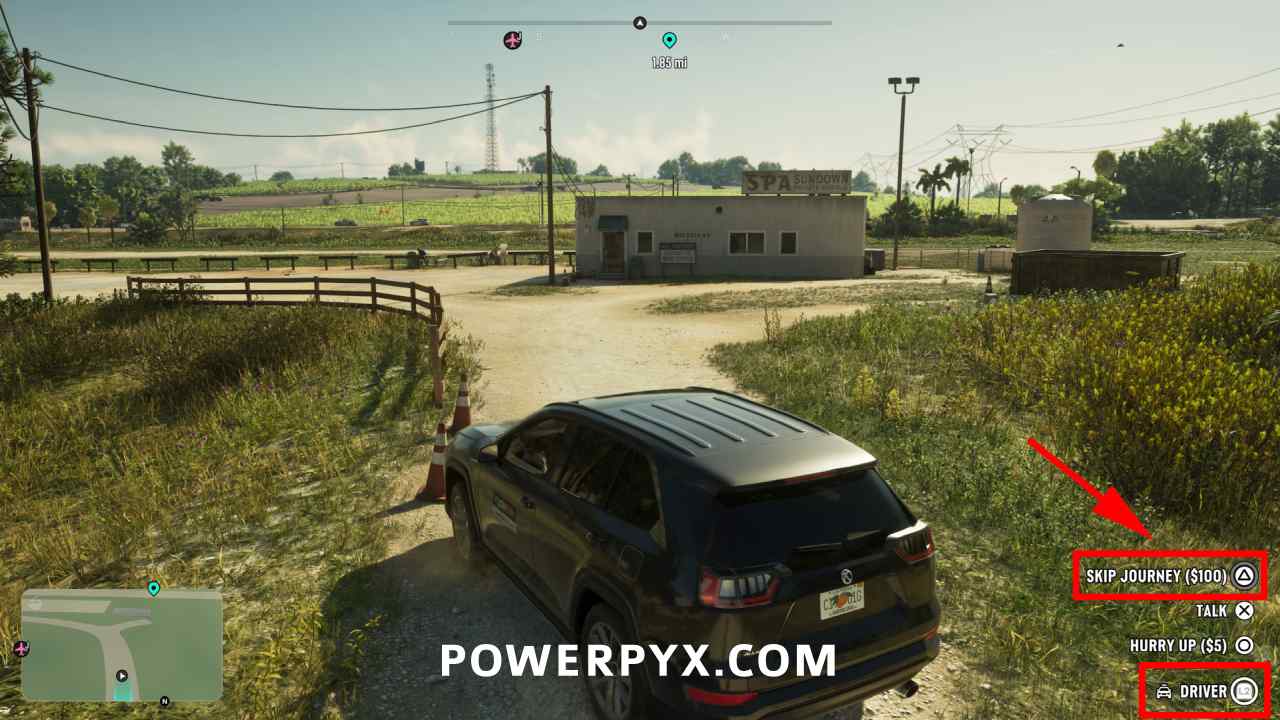
Open the driver menu while seated in the ride. Look for Driver with L2 on PS5 or LT on Xbox, then:
- Hold L2 / LT to focus the driver.
- Check that Skip Journey is labelled on screen, with its additional charge.
- Use Triangle on PS5 / Y on Xbox for that displayed option and follow the current interaction prompt.
PowerPyx’s PS5 driver menu and Chad Reddings’ Xbox recording at 0:33 show the matching choices. Chad’s 0:40 transition shows the later skip sequence. Focus the driver and read the label before using the face button. Getting out of the car alone does not confirm a skipped journey.
Which control cancels, skips or hurries the ride?
Cancel before confirming: use Cancel Trip on the fare screen. Chad’s Xbox capture shows B for this option. Once the driver menu is active, B instead labels Hurry Up ($5). On PS5, that driver request uses Circle.
Skip Journey ($100) is a separate choice in the inspected menus. Hurry Up asks the driver to go faster while the ride continues.
| Current ride state | Observed controls and original evidence |
|---|---|
| Destination and fare screen | Xbox X: Change Destination, A: Confirm, B: Cancel Trip. Chad at 0:30 |
| Driver interaction | Hold L2 / LT to focus Driver, then read the choices. PS5 menu · Xbox at 0:33 |
| Skip Journey ($100) | Triangle / Y in the active driver menu. ItsRazm’s PS5 menu at 0:35 · Chad’s Xbox menu |
| Hurry Up ($5) | Circle / B in the driver menu. Talk is separately labelled Cross / A. PS5 menu · Xbox menu |
These are observed controller bindings in those ride states. Follow the current on-screen interaction for the face-button choice. The stills do not establish a universal tap or hold duration, or a cancellation/refund rule after departure.
Does fast travel cost $100 in total?
Budget for two charges:
- Ride fare: check the quote for your chosen destination before confirming or booking.
- Skip Journey: the inspected PS5 and Xbox menus display an additional $100 option.
PowerPyx and GamesRadar+ both distinguish the skip charge from the ride fare. Chad’s taxi quote shows $78; PowerPyx’s Standard Ryde booking shows $142. Those are different examples, not a fixed fare or a same-distance service comparison.
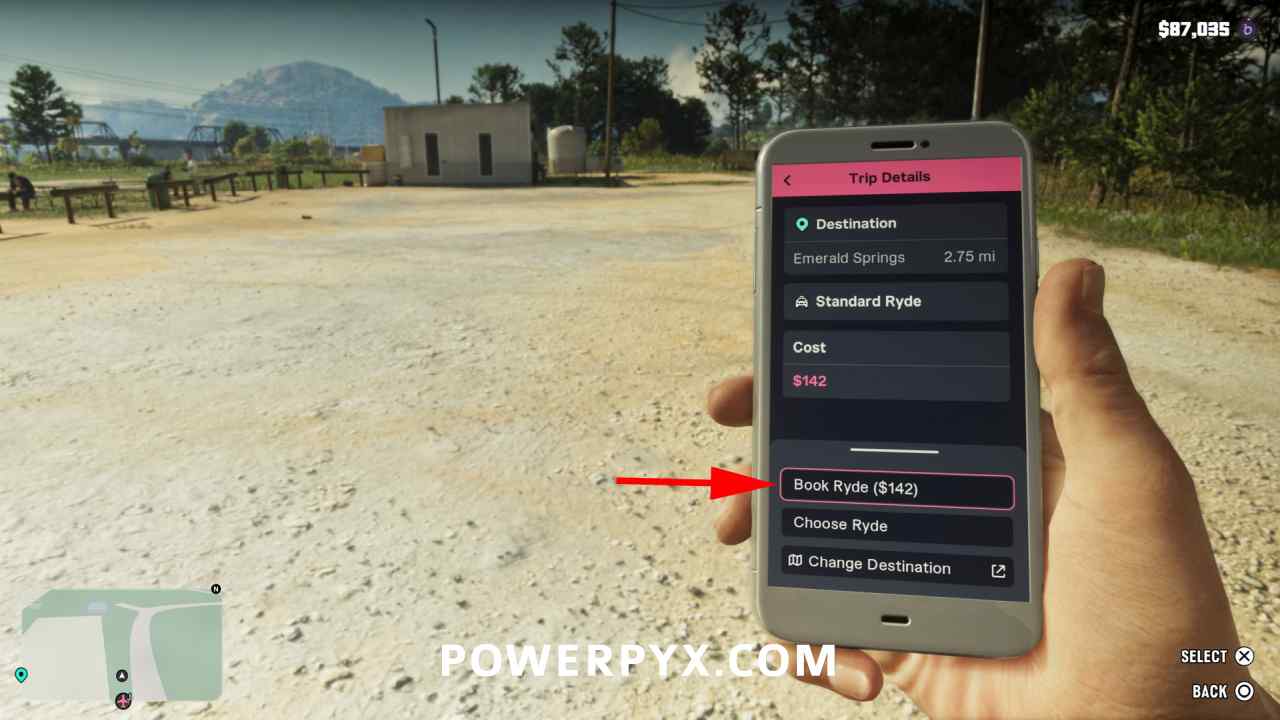
Read your own quote and the skip offer before spending. Hurry Up ($5) is another optional request. Use the money-making guide to plan your budget and count spending once the transaction is confirmed.
How do I call Paradise Taxi or book RydeMe?
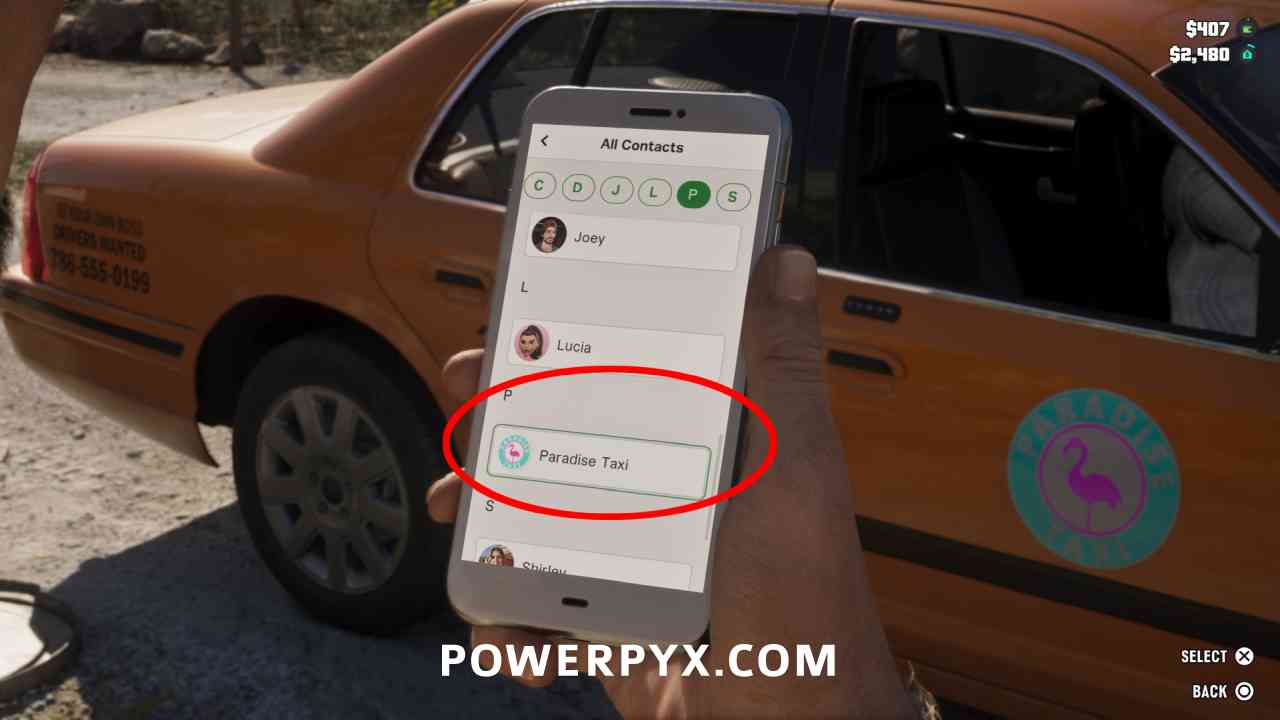
For a cab, open Contacts → All Contacts → Paradise Taxi and place the call. PowerPyx’s selected contact shows that exact name.
When RydeMe is available, open the phone app and check its destination and quoted ride before booking. PowerPyx and GamesRadar+ place the app’s availability in Chapter 2. Check which service is available in your save.
Once the car arrives, enter as a passenger, confirm the destination and fare where prompted, then use the driver interaction to skip. Entering the vehicle and choosing Skip Journey are separate steps.
Can I use a ride for every map stop?
The displayed native RydeMe & Taxis help, published by GTA6DATA, says these services cover most locations reachable by car. Choose a suitable road-accessible destination rather than assuming any collectible marker is a pickup or drop-off point.

Use the transit directory for documented station and ferry stops. A passenger ride is also separate from summoning or recovering your own car; use the missing personal vehicle guide for that task.
For your next road trip, reopen the Leonida Keys guide or choose a nearby shelf from the Book Swap locations. Confirm the actual road destination before booking, then check the activity itself when you arrive.
Last checked 23 November 2026 against the original written guides and linked native PS5/Xbox ride menus. Quotes and transitions belong to the recorded saves. We have not tested a universal fare or control duration on a console.
Related guides
- GTA 6 Cheats: Unlocks, PS5/Xbox Inputs and Safe SavesLearn when GTA 6 cheats unlock, how to enter PS5 and Xbox inputs, and why to save first. Includes checked weather, time and vehicle examples.
- How to Switch Characters in GTA 6: Jason and LuciaHow to switch between Jason and Lucia in GTA 6 on PS5 and Xbox Series X|S: the buttons, Chapter 2 unlock and what to check when switching is unavailable.
- GTA 6 Settings: Subtitles, Controls and Camera ComfortFind GTA 6 subtitles, input assistance and camera settings. Check PS5 narration limits, mono audio and the difference between game and console options.
- GTA 6 The Final Flush: No Flushers Poster and Console HelpStart The Final Flush in GTA 6, reply TRUTH and find Frank’s Waffles. Compare poster examples and open separate hints for the three-light console and stamina notice.