GTA 6 Workout Window: When to Train and Recover
In GTA 6, check the Fitness app for your character’s Strength and Cardio status before exercising. Use the available equipment and follow its prompts. A Workout Complete notification means that session has ended. If the game says you need time to recover, check again when the relevant workout window opens.
What does the workout status mean?
Open the in-game phone’s Fitness app and check the stat you want to train. GamesRadar+ describes the app and the limit on further gains during recovery. HowToVideoGame’s recorded status screens show separate Strength and Cardio messages.
| What the game shows | What to check next |
|---|---|
| Workout window open! | Check the named stat and choose an available exercise. |
| Workout window closing… | Check the Fitness app now if you want to train that stat. The message does not give a verified countdown. |
| Your reps or progress are showing | Finish the displayed reps. If the session still has progress to make, try another available station. |
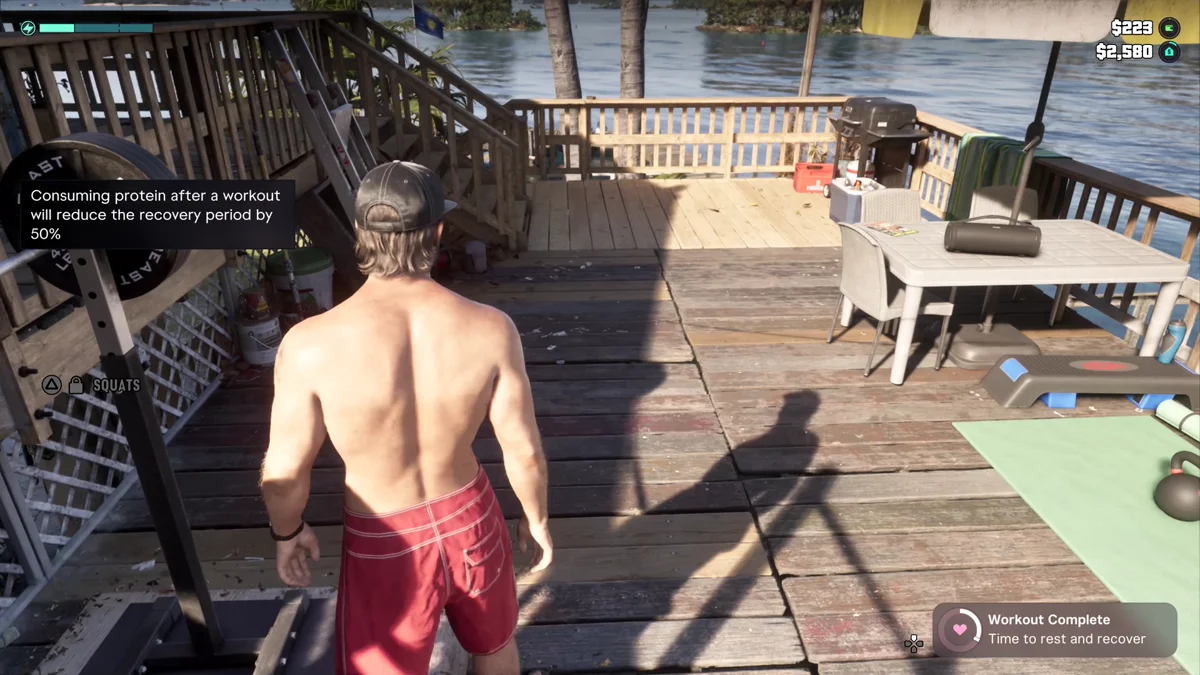
| Workout Complete — Time to rest and recover | The session has finished. Check the other stat or return to another activity. |
| You need time to recover, with a locked equipment prompt | Check that stat’s status before trying more sets. Repeating the same interaction does not establish another completed workout. |
The completion and locked-equipment states are visible in HowToVideoGame’s own PS5 captures. GTAPlaybook’s captured closing-window message corroborates that separate state. These examples do not establish one recovery duration for every character or workout.
Can I shorten recovery in GTA 6?
After the in-game Workout Complete notice, Jason can select Protein Shake from his kitchen fridge when it’s available. The game’s tutorial says consuming protein after a workout halves the recovery period. Check Fitness again to see when that stat is ready. Original recovery tip · Original fridge prompt · GamesRadar+’s recovery reporting
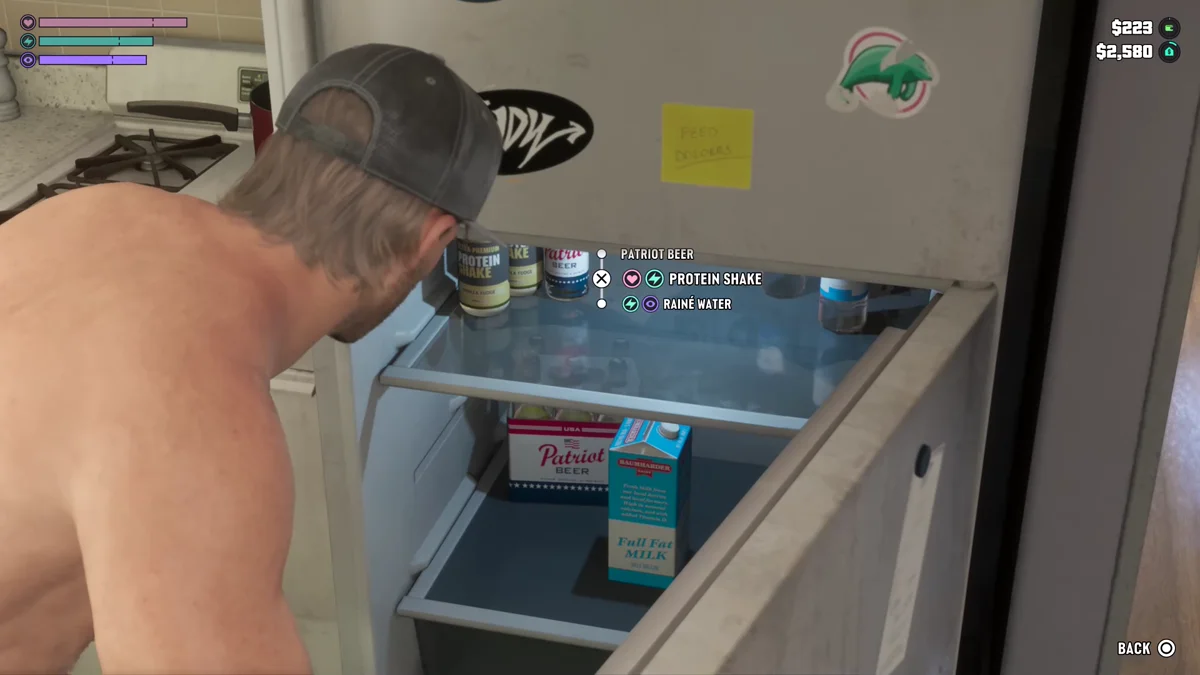
If you’re looking for the Max stamina increased notice from Dr. Merle’s optional mission, see The Final Flush result hint. Use the phone’s Fitness app to check your current workout window and recovery.
Where can I work out without buying a gym membership?
Start at Jason’s house in Key Lento. The rear deck has strength equipment, including a bench press, squat setup and pull-up equipment. For home cardio, check the shed below the house and follow the Hang Bag prompt to set up the heavy bag. GamesRadar+, Shacknews and GTABase’s home-workout walkthrough independently describe the equipment and bag.
Use the Key Lento area reference for the wider location. It marks the area, not the house entrance. If you already know the lower deck from Fix Railing and Jason’s house repairs, the exercise equipment is a useful landmark on your return.
How should I approach my next workout?
- Check the current character and the Strength or Cardio status in Fitness.
- Approach available equipment and follow its displayed interaction and repetition controls. Exercises use different prompts, so read the current screen.
- Watch the workout feedback. Do not use one source’s set count as a universal requirement.
- After the completion message, check the app before repeating the exercise. Choose another available activity while that stat recovers.
GTABase describes requirements varying with the character’s current fitness. Its recorded set counts are examples from that save, not a prescription for yours.
What if my partner has already worked out?
HowToVideoGame recorded Lucia finishing a session while a separate completion card appeared for Jason training nearby. After switching to Jason, its author recorded a locked leg-press prompt and a recovery message. Shacknews independently observed a partner earning fitness credit in a joint gym session. Check each character’s status after training together. HowToVideoGame’s paired session · Shacknews’s playthrough
Does Workout Complete finish a Fitness challenge?
Check Progress → Challenges → Fitness for the particular challenge’s completed status. The GamesRadar+ gameplay menu and PowerPyx challenge list identify two different tasks:
- Gym Member: join a gym. Using the equipment at home is not evidence that you bought a membership.
- Balanced Workout: work out on every type of gym equipment within one in-game day. Check the named challenge’s completion status after the session.
Record the result your game confirms. Use the 100% completion guide and completion planner to keep a manual next goal. The trophies and achievements guide and trophy checklist track awards separately.
Last checked 22 November 2026 against the original guides and their gameplay captures. We have not tested these workouts on a console. Exact cooldown hours and stat-decay rules are unverified here.
Related guides
- GTA 6 Strange Noises: Parrot Stash and Key ValuablesFind GTA 6’s Strange Noises at Three Sheets Liquor. Follow the parrot’s generator clue, check the back room and read the key-valuables map status.
- GTA 6 Shirley’s Rum: Collect the Bottle and ReturnGet Shirley’s rum in GTA 6: find Three Sheets Liquor, ask the clerk, collect the bottle from the counter and return to Shirley in Key Lento.
- GTA 6 Basketball: Score Your First Hoop at Jason’s HouseFind Jason’s house hoop on Peach Palm Dr, follow the checked PS5 prompts and confirm scored credit. Separate Basketball Rookie from the 90-hoop goal.
- GTA 6 Fishing: Controls and Cal’s First ChallengeLearn GTA 6’s fishing phases, catch Cal’s first stoplight parrotfish over 2 lb and use Take Photo for Cal. Check what lure-shop footage actually shows.